


Download ACA Screen Recorder – Free Windows screen capture tool
Overview
ACA Screen Recorder is a lightweight, free utility designed to capture any activity on your Windows desktop and save it as a standard AVI (Audio‑Video Interleaved) movie file. Whether you are creating a step‑by‑step tutorial, documenting a software bug for tech support, or simply archiving a gaming session, ACA gives you a straightforward way to record both video and microphone audio in one package. The developers emphasize that the AVI format makes post‑production editing easier because it is widely supported by most video editors, from free tools like Shotcut to professional suites such as Adobe Premiere Pro.
Beyond basic recording, ACA offers hot‑key configuration, automatic sequential naming for multiple captures, and a modest set of audio‑compressor options. While many screen‑capture programs exist, ACA stands out for its no‑frills approach, low system impact, and the fact that it remains completely free without hidden trial periods or watermarks. Its interface is intentionally simple: a single window with start, stop, pause, and settings buttons, making it accessible for beginners while still providing enough depth for power users who need precise control over codec settings and output directories.
In short, ACA Screen Recorder delivers a secure, reliable, and easy‑to‑use solution for anyone who needs to record Windows screen activity without paying for premium features or dealing with intrusive ads.
Key Features of ACA Screen Recorder
- Free and fully functional: No trial limitations, no watermarks, and no hidden fees.
- AVI output format: Saves recordings as standard AVI files that are compatible with virtually every video editor.
- Microphone audio capture: Record voice‑overs or commentary in sync with screen activity.
- Customizable hot‑keys: Assign keyboard shortcuts for start, pause, and stop to keep your workflow uninterrupted.
- Automatic sequential naming: When creating multiple clips, ACA auto‑increments file names (Video1.avi, Video2.avi, etc.) to keep files organized.
- Adjustable video codecs: Choose from several built‑in codecs and set bitrate, frame rate, and resolution to balance quality and file size.
- Low CPU usage: Optimized to run smoothly in the background, even on older hardware.
- Simple user interface: One‑window design with clear buttons and real‑time preview.
- Secure installation: No bundled third‑party software, spyware, or adware.
- Regular updates: Developers push security patches and minor feature enhancements at least twice a year.
Installation & Usage Instructions
Step‑by‑Step Installation
- Visit the official ACA Screen Recorder website and click the Download for Windows button.
- Save the installer (ACASetup.exe) to your preferred folder.
- Run the installer and follow the on‑screen prompts. The default options are optimal for most users, but you can change the installation directory if needed.
- When installation completes, launch the application from the Start menu or desktop shortcut.
Getting Started with Your First Recording
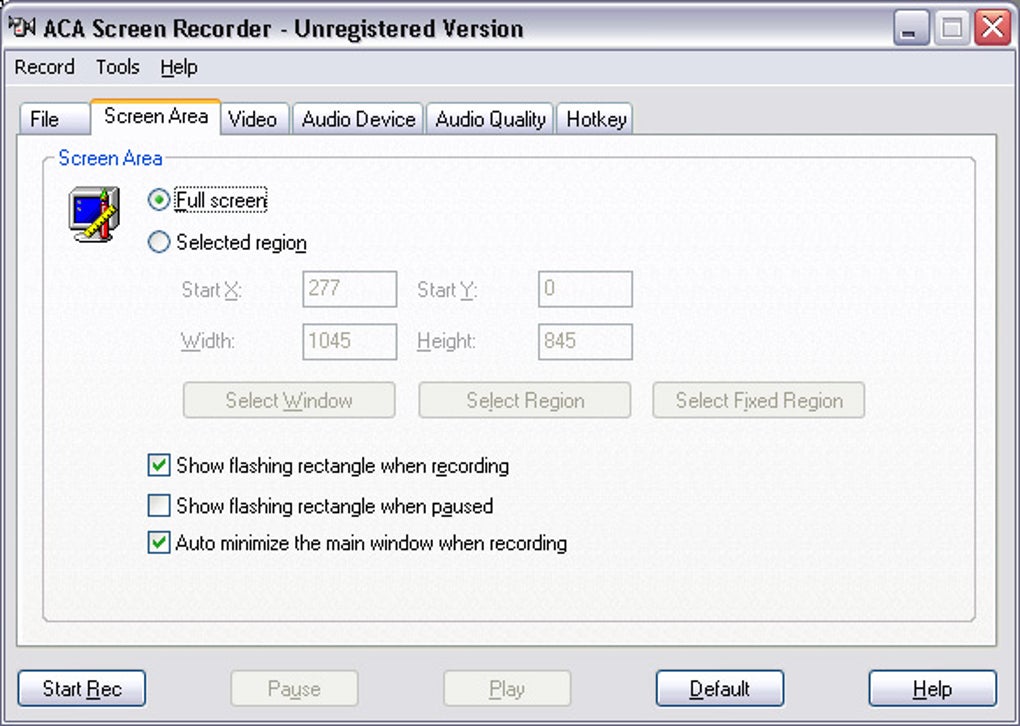
Upon opening ACA, you will see a compact window with four main controls: Start, Pause, Stop, and Settings. Click Settings to configure the output folder, choose the video codec, set the frame rate (default 30 fps works well for most tutorials), and select the audio source (system sound, microphone, or both). If you prefer keyboard shortcuts, enable the Hot‑key tab and assign your favorite key combinations—e.g., Ctrl + Alt + R to start recording.
To record, simply press the Start button or your defined hot‑key. ACA will begin capturing the entire desktop (or a selected window if you enable that option). While recording, you can speak into your microphone to add narration.
Press Pause if you need a brief interruption without creating a new file, then resume with the same hot‑key. When you are finished, hit Stop. The program automatically saves the file as an AVI in the chosen directory and, if you recorded multiple clips, increments the file name sequentially.
Compatibility
ACA Screen Recorder is built exclusively for Windows operating systems, supporting Windows 10, Windows 11, and Windows 7 (64‑bit). The software does not run on macOS, Linux, Android, or iOS, but its output AVI files can be transferred to any platform for playback or editing.
Because the application uses standard Windows APIs, it works well on both modern high‑performance PCs and older machines with modest specifications. Minimum requirements are a 1 GHz processor, 512 MB RAM, and 100 MB of free disk space for installation and temporary recording buffers.
FAQ, Pros & Cons, and Final Thoughts
Is ACA Screen Recorder really free or does it have hidden costs?
Yes, ACA Screen Recorder is completely free. There are no trial periods, no premium upgrades, and no watermarks placed on your videos. The developers fund the project through optional donations, but you are never forced to pay.
Can I record system sound in addition to my microphone?
Absolutely. In the Settings panel you can enable “Capture System Audio,” “Capture Microphone,” or both. This flexibility is useful for gaming tutorials (system sound) or software walkthroughs with narration (microphone).
What video codecs are available, and how do I choose the right one?
ACA ships with a selection of popular codecs such as MPEG‑4, H.264, and Motion JPEG. For the best balance between file size and quality, we recommend H.264 at 30 fps with a bitrate of 4 Mbps. If you need lossless quality for editing, choose Motion JPEG, but expect larger files.
Will ACA impact the performance of my PC while recording?
The application is optimized for low CPU usage. On a typical modern PC, you’ll see less than a 5 % increase in CPU load during recording. On older hardware, you can lower the frame rate or switch to a less demanding codec to keep performance smooth.
How do I share or edit the AVI files after recording?
Since ACA saves recordings as standard AVI files, you can open them in virtually any video editor (e.g., DaVinci Resolve, Adobe Premiere, Windows Video Editor). You can also upload them directly to platforms that accept AVI, or convert them to MP4 using free tools like HandBrake if needed.
Pros
- Completely free with no watermarks.
- Simple, uncluttered interface.
- Hot‑key support for hands‑free operation.
- Automatic sequential naming saves organization time.
- Low system resource consumption.
Cons
- Windows‑only; no macOS or Linux version.
- Limited advanced editing features (relies on external editors).
- AVI files can be larger than modern MP4 containers.
Conclusion – Should You Download ACA Screen Recorder?
If you need a reliable, no‑cost screen‑capture solution for Windows, ACA Screen Recorder checks all the essential boxes. Its straightforward UI, hot‑key functionality, and automatic file naming make it ideal for educators, IT support staff, and gamers alike. While power users may eventually migrate to more feature‑rich suites for advanced editing, ACA remains a solid first‑step tool that won’t bog down your system or surprise you with hidden fees. Ready to start capturing your screen instantly? Download ACA Screen Recorder now and enjoy a secure, free way to record, narrate, and share your desktop activity.







